The AB Electronics UK Knowledge Base provides support solutions, tutorials and troubleshooting guides.

YOU WILL NEED THIS BOARD
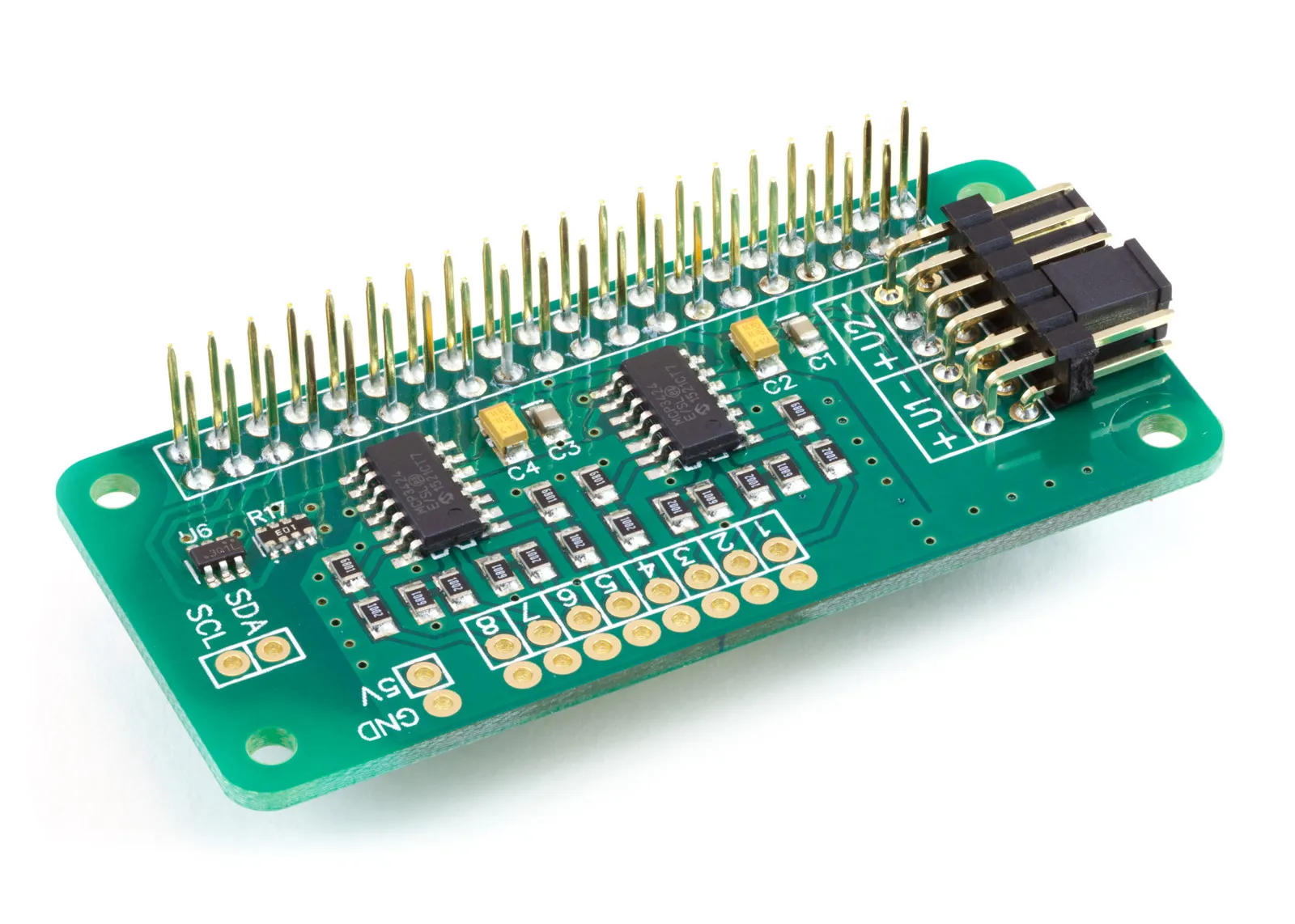
ADC Pi
8 Channel 17-bit Single-Ended Analogue to Digital Converter for the Raspberry Pi and Single-Board Computers
£16.19 ex VAT
You will need this board: ADC Pi - 8-channel 18-bit analogue to digital converter
This tutorial will use an ADC Pi with an ESP32-P4 development board running ESPHome. We will read a voltage on one channel and show it on a web page, then expand the configuration to read all 8 channels. You will need a Waveshare ESP32-P4-Module-DEV-KIT, an ADC Pi and a 10K potentiometer to give us a voltage to measure.
ESPHome does not include support for the MCP3424 analogue to digital converter used on the ADC Pi, so we will add it with an external component. An external component is a small add-on that you place in your ESPHome configuration folder, and ESPHome builds it into the firmware alongside its own components.
We will use the ESPHome Device Builder to write the configuration and install it on the ESP32-P4. ESPHome Device Builder runs as a Home Assistant add-on or as a standalone app on your computer; see the ESPHome getting started guide if you have not installed it yet.
We are using the Waveshare ESP32-P4-Module-DEV-KIT for this tutorial because it has a 40-pin GPIO header with the same layout as the Raspberry Pi, so the ADC Pi plugs straight onto it. The ESP32-P4 does not have Wi-Fi built in; the DEV-KIT includes an ESP32-C6 co-processor that provides Wi-Fi, and ESPHome talks to it using the esp32_hosted component.
Stage 1 - Setting up the ESP32-P4
Make sure the ESP32-P4-Module-DEV-KIT is disconnected from power, then line up pin 1 on the ADC Pi with pin 1 on the 40-pin header of the DEV-KIT and press the ADC Pi down firmly onto the pins. On the DEV-KIT, the I2C bus uses GPIO7 for SDA on header pin 3 and GPIO8 for SCL on header pin 5.
Open ESPHome Device Builder and click New Device. Give your device the name p4-mcp3424-adc, choose ESP32-P4 as the device type and click Skip to finish the wizard without installing. Then click Edit on the new device card to open the configuration file. Keep the api encryption key and the ota password that the wizard created, and replace the rest of the file with the sections below.
The first part of the configuration is the same as in our other ESP32-P4 tutorials. It sets the device name, the ESP32-P4 chip, the ESP32-C6 Wi-Fi co-processor, the logger, Wi-Fi, the web server and the I2C bus.
substitutions:
  name: "p4-mcp3424-adc"
  friendly_name: "P4 MCP3424 ADC"
esphome:
  name: ${name}
  friendly_name: ${friendly_name}
esp32:
  board: esp32-p4-evboard
  flash_size: 16MB
  framework:
    type: esp-idf
esp32_hosted:
  variant: ESP32C6
  active_high: true
  reset_pin: GPIO54
  cmd_pin: GPIO19
  clk_pin: GPIO18
  d0_pin: GPIO14
  d1_pin: GPIO15
  d2_pin: GPIO16
  d3_pin: GPIO17
logger:
  level: DEBUG
  hardware_uart: UART0
api:
ota:
  - platform: esphome
wifi:
  ssid: !secret wifi_ssid
  password: !secret wifi_password
web_server:
  port: 80
  version: 3
  log: true
i2c:
  sda: GPIO7
  scl: GPIO8
  frequency: 400kHz
  scan: true
Paste the encryption key and password that the wizard created back into the api and ota sections, and check that wifi_ssid and wifi_password are set in Secrets.
Stage 2 - Adding the MCP3424 component
The ADC Pi contains two MCP3424 analogue to digital converters from Microchip. Each MCP3424 has 4 input channels and can read a voltage with up to 18 bits of resolution. The two chips use I2C addresses 0x68 and 0x69, giving you 8 channels in total. If you have changed the address selection jumpers on your ADC Pi, you will need to change these numbers to match.
First, download the MCP3424 component from github.com/abelectronicsuk/ABElectronics_ESPHome_Libraries/ADC-Pi-ESPHome-MCP3424/esphome-mcp3424.zip and unzip it. Copy the components folder into your ESPHome configuration folder, so the files sit in a folder called components/mcp3424 next to your device's YAML file:
esphome/
+-- p4-mcp3424-adc.yaml
+-- components/
    +-- mcp3424/
        +-- __init__.py
        +-- sensor.py
        +-- mcp3424.h
        +-- mcp3424.cpp
If you run ESPHome Device Builder as a Home Assistant add-on, the configuration folder is /config/esphome. You can copy the files there with the File editor or Samba share add-ons.
Next, we tell ESPHome where to find the component.
external_components:
  - source:
      type: local
      path: components
    components: [ mcp3424 ]
type: local tells ESPHome that the component is in a folder on your computer, and path: components is the folder name, relative to your YAML file. components lists the external components to load from that folder.
Now we can add the two MCP3424 chips.
mcp3424:
  - id: adc_1
    address: 0x68
    update_interval: 5s
  - id: adc_2
    address: 0x69
    update_interval: 5s
Each chip gets an id, which we will use to tell ESPHome which chip a channel belongs to. update_interval sets how often the channels are read; every 5 seconds, each chip reads all of its channels in turn and sends the results to the web page and Home Assistant.
The MCP3424 takes longer to read a value at higher resolutions, and at 18 bits each reading takes about 270ms. The component starts each reading and comes back for the result when it is ready, so the ESP32-P4 can carry on with other work in the meantime. update_interval must be longer than the time all the channels on a chip take to read; at 18 bits, 4 channels need just over 1.1 seconds.
Note: the DS1307 on the RTC Pi also uses address 0x68. If you want to use an RTC Pi and an ADC Pi on the same bus, change the address selection jumpers on the ADC Pi to move the first MCP3424 to a different address.
Stage 3 - Reading a voltage
To give us a voltage to measure, connect the two outer pins of the 10K potentiometer to 5V and ground, and connect the middle pin to channel 1 on the ADC Pi. Turning the potentiometer will now change the voltage on channel 1 from 0V to 5V.
Each channel is added as a sensor.
sensor:
  - platform: mcp3424
    mcp3424_id: adc_1
    name: "ADC Channel 1"
    channel: 1
    resolution: 18
    gain: 1
mcp3424_id tells ESPHome which chip the channel is on, and channel picks the input on that chip, from 1 to 4. Channels 1 to 4 on the ADC Pi are on the first chip, adc_1, and channels 5 to 8 are channels 1 to 4 on the second chip, adc_2.
resolution sets the number of bits the MCP3424 uses for each reading. Higher resolutions give finer steps but take longer to read:
| Resolution | Readings per second | Step size at the ADC Pi input |
|---|---|---|
| 12-bit | 240 | 2.47mV |
| 14-bit | 60 | 0.62mV |
| 16-bit | 15 | 0.154mV |
| 18-bit | 3.75 | 0.039mV |
gain sets the programmable gain amplifier inside the MCP3424 to 1, 2, 4 or 8. A higher gain amplifies small signals, but it also divides the maximum input voltage by the same amount. For a 0V to 5V input, keep the gain at 1.
The MCP3424 can measure up to 2.048V on its inputs. To allow you to read up to 5V, each input on the ADC Pi has a voltage divider made from a 10K resistor and a 6K8 resistor, which reduces the input voltage before it reaches the MCP3424:
V_adc = V_in × 6.8 / (10 + 6.8)
The component reports the voltage at the MCP3424, so we need to multiply each reading by (10 + 6.8) / 6.8 = 2.470588 to get the voltage at the ADC Pi input. This gives a maximum input of 2.048V × 2.470588 = 5.06V.
We will store the ratio as a substitution at the top of the file, so you only need to change it in one place.
substitutions:
  name: "p4-mcp3424-adc"
  friendly_name: "P4 MCP3424 ADC"
  divider_ratio: "2.470588"
Then we add two filters to the sensor.
    filters:
      - multiply: ${divider_ratio}
      - clamp:
          min_value: 0
Filters change a sensor's value before it is published. multiply converts the voltage at the MCP3424 back to the voltage at the ADC Pi input.
The ADC Pi reads its inputs in single-ended mode, with the negative input of each channel connected to ground, so the voltage should never go below 0V. With nothing connected, or with 0V on the input, a small amount of electrical noise can still give a tiny negative reading. clamp with min_value: 0 replaces any reading below 0 with 0.
Stage 4 - Reading all 8 channels
Now we have one channel reading a voltage. To read all 8 channels, copy the sensor 7 more times. For channels 2 to 4, keep mcp3424_id: adc_1 and change the channel number. For channels 5 to 8, use mcp3424_id: adc_2 with channels 1 to 4. resolution and gain default to 18 bits and a gain of 1, so you can leave them out when you want those settings.
That is everything we need; your configuration should now look like this.
substitutions:
  name: "p4-mcp3424-adc"
  friendly_name: "P4 MCP3424 ADC"
  divider_ratio: "2.470588"
esphome:
  name: ${name}
  friendly_name: ${friendly_name}
esp32:
  board: esp32-p4-evboard
  flash_size: 16MB
  framework:
    type: esp-idf
esp32_hosted:
  variant: ESP32C6
  active_high: true
  reset_pin: GPIO54
  cmd_pin: GPIO19
  clk_pin: GPIO18
  d0_pin: GPIO14
  d1_pin: GPIO15
  d2_pin: GPIO16
  d3_pin: GPIO17
logger:
  level: DEBUG
  hardware_uart: UART0
api:
ota:
  - platform: esphome
wifi:
  ssid: !secret wifi_ssid
  password: !secret wifi_password
web_server:
  port: 80
  version: 3
  log: true
i2c:
  sda: GPIO7
  scl: GPIO8
  frequency: 400kHz
  scan: true
external_components:
  - source:
      type: local
      path: components
    components: [ mcp3424 ]
mcp3424:
  - id: adc_1
    address: 0x68
    update_interval: 5s
  - id: adc_2
    address: 0x69
    update_interval: 5s
sensor:
  - platform: mcp3424
    mcp3424_id: adc_1
    name: "ADC Channel 1"
    channel: 1
    resolution: 18
    gain: 1
    filters:
      - multiply: ${divider_ratio}
      - clamp:
          min_value: 0
  - platform: mcp3424
    mcp3424_id: adc_1
    name: "ADC Channel 2"
    channel: 2
    filters:
      - multiply: ${divider_ratio}
      - clamp:
          min_value: 0
  - platform: mcp3424
    mcp3424_id: adc_1
    name: "ADC Channel 3"
    channel: 3
    filters:
      - multiply: ${divider_ratio}
      - clamp:
          min_value: 0
  - platform: mcp3424
    mcp3424_id: adc_1
    name: "ADC Channel 4"
    channel: 4
    filters:
      - multiply: ${divider_ratio}
      - clamp:
          min_value: 0
  - platform: mcp3424
    mcp3424_id: adc_2
    name: "ADC Channel 5"
    channel: 1
    filters:
      - multiply: ${divider_ratio}
      - clamp:
          min_value: 0
  - platform: mcp3424
    mcp3424_id: adc_2
    name: "ADC Channel 6"
    channel: 2
    filters:
      - multiply: ${divider_ratio}
      - clamp:
          min_value: 0
  - platform: mcp3424
    mcp3424_id: adc_2
    name: "ADC Channel 7"
    channel: 3
    filters:
      - multiply: ${divider_ratio}
      - clamp:
          min_value: 0
  - platform: mcp3424
    mcp3424_id: adc_2
    name: "ADC Channel 8"
    channel: 4
    filters:
      - multiply: ${divider_ratio}
      - clamp:
          min_value: 0
Click Save, then Install. For the first install, choose Plug into this computer and connect the DEV-KIT to your computer with a USB cable. After the first install, you can choose Wirelessly to update the board over Wi-Fi. The first build takes a little longer than usual, as ESPHome compiles the MCP3424 component.
When the install finishes, the log window opens. The I2C scan should find the two MCP3424 chips at 0x68 and 0x69, and the ES8311 audio chip on the DEV-KIT at 0x18. Every 5 seconds, you should see a reading from each channel. With the potentiometer set to the middle of its range, channel 1 will show around 2.5V:
[D][mcp3424]: Channel 1: raw=64762, 1.011906 V
[D][sensor]: 'ADC Channel 1': Sending state 2.50000 V with 6 decimals of accuracy
The mcp3424 line shows the raw reading from the chip and the voltage at the MCP3424 input. The sensor line shows the value after the filters, which is the voltage at the ADC Pi input. Turn the potentiometer, and the voltage should change from 0V to 5V.
To see all 8 channels on one page, open a web browser on the same network and go to http://p4-mcp3424-adc.local. If that address does not work on your computer, use the IP address shown in the log after the board connects to Wi-Fi.
If ESPHome reports that it cannot find the mcp3424 component, check that the components folder is in the same folder as your YAML file. If the scan does not find 0x68 or 0x69, check that the ADC Pi is pushed fully onto the 40-pin header and that pin 1 lines up with pin 1 on the DEV-KIT. If the log shows "Previous conversions still running", increase update_interval or lower the resolution.
Also useful for your Raspberry Pi project
Temperature & Sensing
1 Wire Pi Plus
Connect dozens of 1-Wire sensors - temperature, iButtons, EEPROMs - via a single GPIO pin. Stacks directly on the 40-pin header.
Analogue I/O
ADC Pi
Read up to 8 analogue inputs - perfect for pairing with your temperature sensors or other analogue-output devices.
All-in-one
Expander Pi
Combines ADC, DAC, 32 GPIO ports and a real-time clock on one board. The most versatile board for complex Raspberry Pi projects.
